Cell
In MATLAB, cell and structure are heterogeneous containers: special arrays that, unlike a regular array, can hold elements of different types.
- A cell array directly extends the regular array — each element (called a cell) may be of a different data type
- A single-element cell is therefore not very meaningful; “cell array” by default refers to one with multiple elements
- A cell may itself be a cell array, forming a nested cell array
- Example:
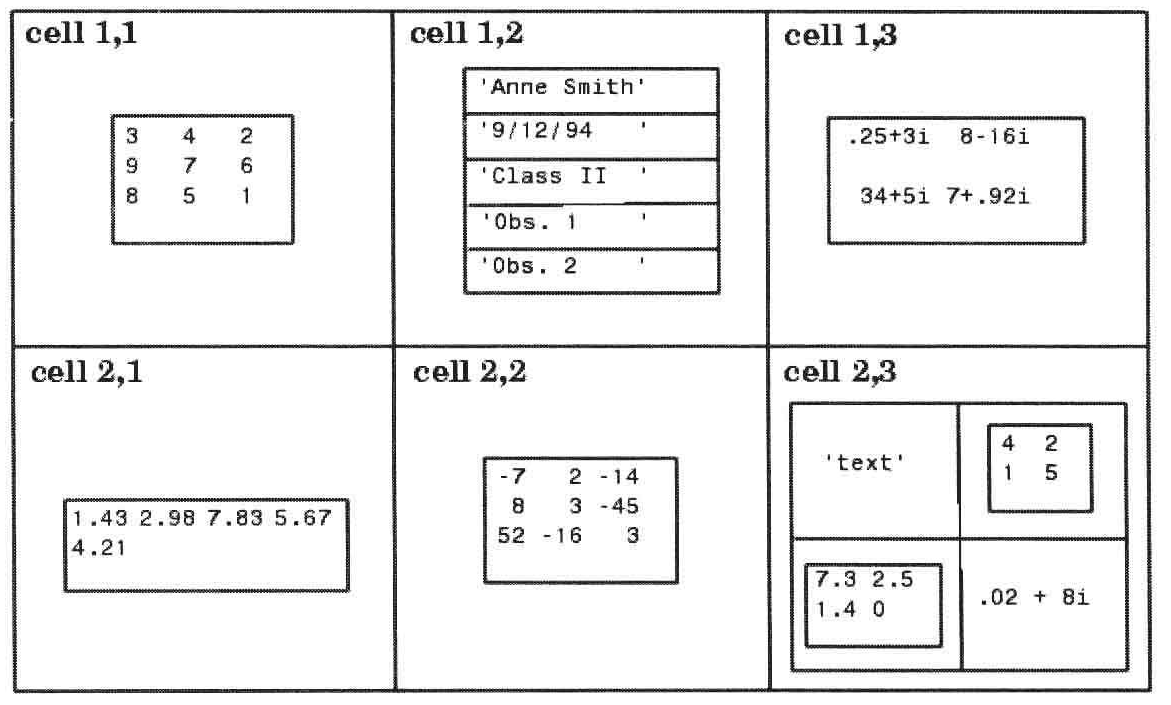
- Curly braces
{}are the cell delimiter
Properties and Display
iscell- Display
celldispprints the contents of every cell of a cell arraycellplotshows the structural diagram of a cell array
Creation
-
Assignment statements
C(ind) = {x}C{ind} = x
- ind is an ordinary array index
- These also serve to expand a cell array
-
Function
cell(<[sz1,...,szn]>)- Returns an sz1-by-…-by-szn cell array, with every cell empty (
[]) - With a single argument sz1, returns an sz1-by-sz1 square cell array
- Returns an sz1-by-…-by-szn cell array, with every cell empty (
-
These methods always produce a “rectangular” cell array; unassigned cells default to empty
[].
Example:
>> A = cell(2,3)
A =
  2x3 cell array
    {0x0 double}    {0x0 double}    {0x0 double}
    {0x0 double}    {0x0 double}    {0x0 double}
>> A{1,1} = 'hello'
A =
  2x3 cell array
    {'hello'   }    {0x0 double}    {0x0 double}
    {0x0 double}    {0x0 double}    {0x0 double}
>> A(2,3) = {123}
A =
  2x3 cell array
    {'hello'   }    {0x0 double}    {0x0 double}
    {0x0 double}    {0x0 double}    {[     123]}
>> A{3,3} = [1;2]
A =
  3x3 cell array
    {'hello'   }    {0x0 double}    {0x0 double}
    {0x0 double}    {0x0 double}    {[     123]}
    {0x0 double}    {0x0 double}    {2x1 double}
Access and Removal
A cell array is accessed via Matlab Array - Indexing; the only twist is that wrapping the index in parentheses () returns a cell sub-array (still of class cell), whereas wrapping the index in curly braces {} returns the contents themselves.
- This is also why cell-array assignment has two forms.
Example:
>> A{2,3}
ans =
   123
>> A(2,3)
ans =
  1x1 cell array
    {[123]}
You can also delete or slice from a cell array with indexing:
A{ind} = []clears the element at ind (assigns it the empty value)A(ind) = []removes a slice from A- To keep A rectangular, only one component of ind may differ from
: - In other words, you can only remove whole rows or columns
- To keep A rectangular, only one component of ind may differ from
Nesting
A cell of a cell array can itself be a cell array, producing a nested cell array. Construction and access follow the rules of an ordinary array.
>> A{2,2} = {1, 2;'hello', cell(2)}
A =
  2x2 cell array
    {0x0 double}    {0x0 double}
    {0x0 double}    {2x2 cell  }
>> A{2,2}(2,1)
ans =
  1x1 cell array
    {'hello'}
>> A{2,2}{2,2}(2) = {'sub'}
A =
  2x2 cell array
    {0x0 double}    {0x0 double}
    {0x0 double}    {2x2 cell  }
>> A{2,2}{2,2}{2}
ans =
'sub'- In a nested cell array, the intermediate indices typically use curly braces
{}.