Structure
In MATLAB, structure and cell are called heterogeneous containers: special arrays that, unlike a regular array, can hold elements of different types.
- A structure works like a data container: it holds multiple values of possibly different types under named fields
- A field may itself be a structure, producing a nested structure
- A single structure is itself a 1×1 structure array
- Example:
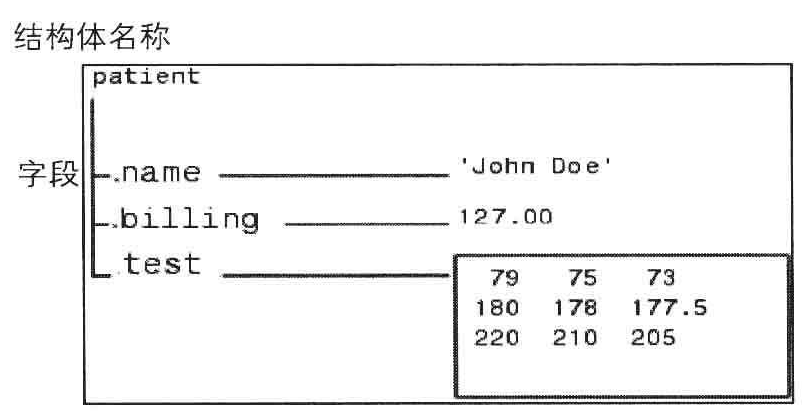
- The dot
.is the structure delimiter
Properties
- Identity test functions
isstructisfield(S,F)— checks whether F is the name of one of S’s fields- The result can be true only when S is a
structand F is a char vector
- The result can be true only when S is a
fieldnamesreturns a cell whose elements are the names of every field of astruct
Creation
- Assignment:
struct.field = x- Connect the structure name and field name with a dot
. - To create a larger structure array, use array indexing:
struct(i).field = x- Every structure in a structure array shares the same fields
- Unassigned fields default to an empty array
- Connect the structure name and field name with a dot
- Function struct
Example using assignment to build a structure array:
>> lover.name = 'Josh';
>> lover.age = 21;
>> lover
lover =
  struct with fields:
    name: 'Josh'
     age: 21
>> lover(2).score = [90 80 95]
lover =
  1x2 struct array with fields:
    name
    age
    score
>> lover(2)
ans =
  struct with fields:
     name: []
      age: []
    score: [90 80 95]
>> lover(1)
ans =
  struct with fields:
     name: 'Josh'
      age: 21
    score: []
>> whos
  Name       Size            Bytes  Class     Attributes
  ans        1x1               424  struct
  lover      1x2               568  struct
Access
A structure array uses indexing to reach the structures inside and their fields; see Matlab Array - Indexing. The basic syntax is struct(I1).field(I2).
- I1 indexes into the structure(s) of the structure array struct
- You may pass an index spanning multiple structures only when no field access follows, otherwise it raises an error
-
You can index into part of a field only when you refer to a single element of a structure array
- I2 indexes into the elements of the field field of those structures
Example:
>> lover(2).score([1,3])
ans =
    90    95
>> lover(:).score(:)
Expected one output from a curly brace or dot indexing expression, but there were 2 results.
>> lover(:)
ans =
  2x1 struct array with fields:
    name
    age
    score
Dynamic Fields
When the field name is itself a variable, use dynamic fields: wrap the variable in parentheses ().
>> S.(char(100+rand*10)) = [] % use a random value as the field name
S =
  struct with fields:
    m: []
>> S.(char(100+rand*10)) = []
S =
  struct with fields:
    m: []
    e: []

>> S1.a = 1; S1.b = 2; F = 'ab';
>> S1.(F(randi(2))) % access a randomly chosen field
ans =
     1
Removal
rmfield deletes selected fields from a structure and returns the trimmed structure.
- Syntax:
rmfield(S,fieldname)- fieldname may be a char vector or a cell array of char vectors
Nesting
A field of a structure may itself be a structure, producing a nested structure. Construction and access follow the same rules as for an ordinary structure.
>> S.A.a = rand(2)
S =
  struct with fields:
    A: [1x1 struct]
>> S.A(2).a = rand(2)
S =
  struct with fields:
    A: [1x2 struct]
>> S.A(1).a(2,1)
ans =
0.8491- Dot-separated nesting reads naturally as a path:
S.layer1.layer2...